There’s a specific moment in a WordPress build where you realize something is wrong with your tools.
For me it happened at 11pm on a Tuesday, on a client site for a restaurant group. Six locations. Each location had opening hours, a phone number, a manager’s name, and a photo. Perfect repeater field. I’d set it up in ACF in about ninety seconds, felt smug about it, poured a coffee, and opened Elementor to drop it on the page.
And there was nothing there.
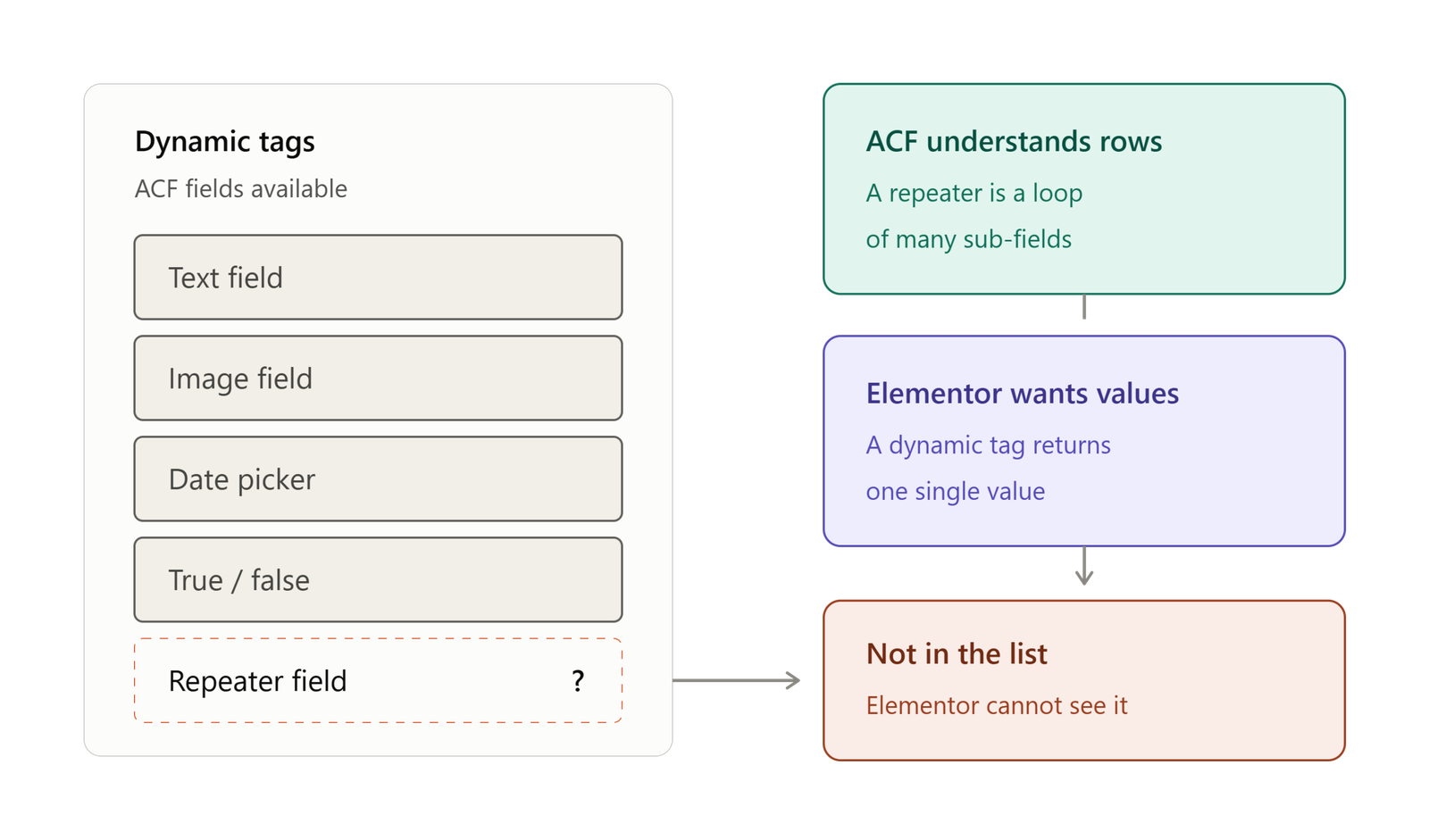
Not an error. Not a warning. Just… nothing. Elementor’s Dynamic Tags list showed me the text fields, the images, the true/false toggles — everything except the one field type I actually needed. The repeater simply didn’t exist as far as Elementor was concerned.
The thing nobody warns you about
Here’s the mismatch, and once you see it you can’t unsee it.
Elementor’s dynamic tag system was designed around single values. One title. One image. One date. You point a widget at a field, it fetches the value, it renders. Clean.
A repeater isn’t a value. A repeater is a loop. It’s a variable number of rows, each containing a variable number of sub-fields, and Elementor’s widget model has no native concept of “render this widget N times, once per row.” So the two systems look at each other and shrug.
ACF is doing its job. Elementor is doing its job. The gap between them is where you live now.
The four bad options
Every WordPress developer who hits this wall discovers the same four escape routes, roughly in this order.
Stop using the repeater. Just make location_1_name, location_2_name, location_3_name. It works. It’s also a data-modeling crime, and the moment the client adds a seventh location you’re back in ACF creating fields at 11pm again. You didn’t solve the problem, you deferred it.
Write a shortcode. Loop the repeater in PHP, echo some HTML, drop [my_locations] into a Text Editor widget. This is where most people land. It works — but you’ve just built a black box. The client can’t style it. You can’t style it in Elementor. Every design change is a trip back to functions.php. You’ve handed the page builder a sealed envelope and told it to display the envelope.
Custom Elementor widget. The “correct” answer, and genuinely the right call on a big project. Also several hundred lines of boilerplate, a widget class, controls registration, a render method, and a build you now have to maintain forever — for what is conceptually a foreach loop.
Buy an addon pack. Reasonable. But you’re often installing forty widgets to get one, and paying yearly for it.
None of these are wrong, exactly. They’re just all disproportionate. The gap between the problem (“show my rows”) and the solution (“write a widget class”) is absurd.
What I actually wanted
I sat there at midnight with the coffee going cold and wrote down what the tool should do, in one sentence:
Let me point Elementor at a repeater field, design one row visually, and have it repeat.
That’s it. That’s the whole feature. No black box, no PHP, no forty widgets I’ll never use. Design the row like you’d design anything else in Elementor — with the panel, with the padding controls, with the typography you actually wanted — and let the loop happen underneath.
The reason that sentence took a long time to turn into a plugin is that “design one row visually” is the hard part. Anyone can loop a repeater. Making the loop addressable from the Elementor panel — so the sub-fields show up where a designer expects them, so the styling sticks, so the client can edit it without calling you — is where the actual engineering lives.